Support
AUD BRL CAD DKK EUR NOK NZD PLN GBP SEK CHF USD
English language option flag English
Jacksam's scripts logo
jaksam Your source for FiveM Scripts
Home
Products
ESX
  • [ESX] Drugs Creator
  • [ESX] Jobs Creator
  • [ESX] Robberies Creator
View More
QBCore | QBox
  • [QBCore] Drugs Creator
  • [QBCore] Jobs Creator
  • [QBCore] Robberies Creator
View More
💻 ESX + QBCore
  • Drugs Creator
  • Jobs Creator
  • Robberies Creator
View More
Easy Allowlist & Queue

Easy Allowlist & Queue

✔️ ESX  ✔️ QBCore  ✔️ Custom Framework

This script will make extremely easy to whitelist players, create queue priorities and reserved slots very easy from an in-game menu. This also works connected to discord roles

Showcase Video Click to watch the script in action here!

2a945da5d3d2dfdfa62b6588a98e870d5c8d2daf.jpeg
10063614f748e4473517966b7146208b22958f57.png
1d1db95723dd6bc7ae0a678a143e03ac5673b312.png
b942fc0d0eed94f88b8533f28ceb58a920a838e9.png
d2b1c5ebde224b126cb7466cac3e8cf77779e3e4.png

🔥 Why Easy Allowlist?

  • Easy to Install: Minimal setup time, drag and drop installation
  • Easily whitelist your players: No time wasted
  • Queue priority: Admins or premium players first!
  • Reserved slots: Admins will always have space to join

✅ Allowlist

  • Can be enabled/disabled
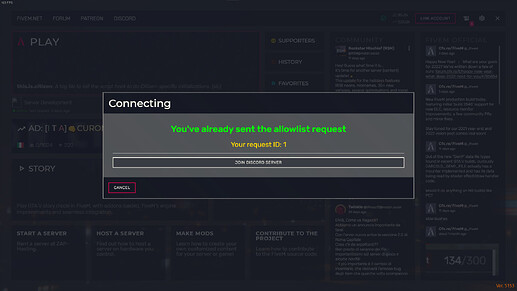
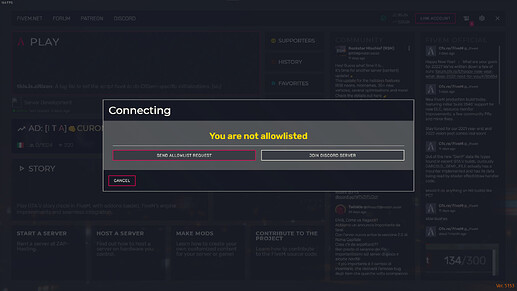
  • Players who aren’t in the allowlist will have the possibility to send the allowlist request
  • Server admins can easily accept the player allowlist directly from the in-game menu
  • Can use as main identifier Steam / Rockstar license / Discord
  • Can use a Discord role you decide to allow players to get in the server
  • When an admin accepts a player allowlist request, if the main identifier used is Discord, it will automatically give the allowlisted role on Discord to the player
  • When an admin removes a player from the allowlist, if the main identifier used is Discord, it will automatically remove the allowlisted role on Discord from the player
  • New users can easily join your Discord server through the “Join Discord Server” button

⌛ Queue

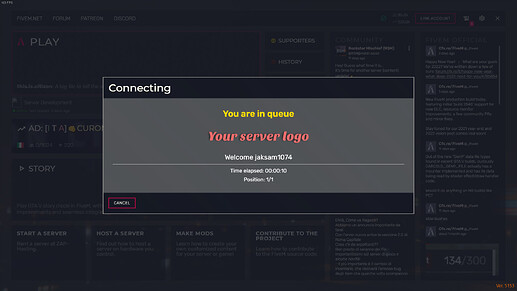
  • When a player connects, if the server is full he will be placed in a queue so he can be informed on his queue current position and the time elapsed
  • Queue can have different priorities (will be explained later)
  • Queue can have reserved slots (will be explained later)
  • If a player crashes when playing, he will be able to join the queue with a higher priority (you can decide how many minutes the player has to reconnect and what priority to add to him)
  • You can set a minimum time before players can join after the server starts, so your server can load properly

⌛ Queue priority

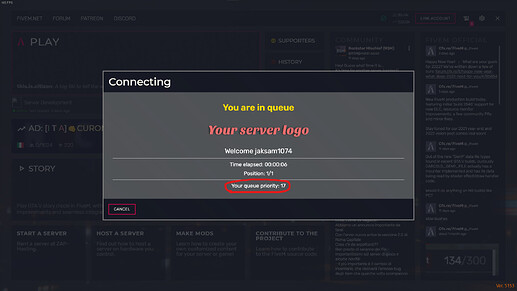
  • Players with a higher queue priority will connect before other players in case there is a free slot
  • You can easily create a queue priority for a specific player (Example: server owner)
  • You can easily create a queue priority for a Discord role, so all players with that role on Discord will have the role priority as well (Example: admins)
  • Different priorities will be summed, to allow the player to have an higher priority in case he deserve an higher priority. Example:
    1. Player specific priority = 10
    2. Discord role “Admin” priority = 20
    3. Discord role “Police” priority = 5
      Final player queue priority: 10 + 20 + 5 = 35
  • You can edit the previously created player/roles priorities
  • You can delete the prieviously created priorities

🔐 Reserved Slots

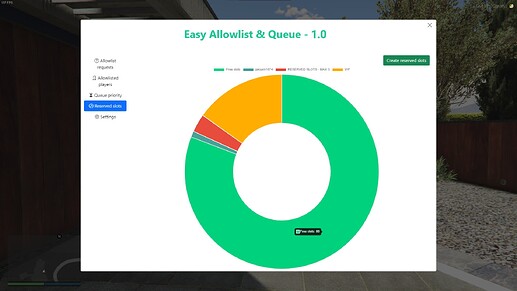
  • You can create reserved slots, to ensure that specific players / roles will always able to connect
  • You can easily create a reserved slot for a specific player
  • You can easily create a reserved slot for a Discord role (defining how many slots will be reserved for that slot)
  • You can edit reserved slots previously created
  • You can delete reserved slots previously created
  • If a player is in different roles that have a reserved slots, the role with more free spaces will be used

🎉 Discord Features

  • You can enable the discord features to make your job easier
  • You’ll be able to use the allowlist role
  • Allowlist role will be automatically gave/removed
  • You’ll be able to use reserved slots based on Discord roles
  • You’ll be able to use queue priority based on Discord roles

⚙️ Installation

  • Download the script.
  • Extract wherever you want into your resources.
  • Add ensure easy_allowlist in your server.cfg
  • Enable discord features (easy tutorial)

⚙️ How to allowlist myself?

You can simply send the allowlist request, and to accept it from server console by using the command add_allowlist YourRequestId

📝 Information?

The script uses the official FiveM escrow system

AUD BRL CAD DKK EUR NOK NZD PLN GBP SEK CHF USD
Cart gta character
Your cart is empty!
Looks like your cart is empty! Add some items to get started.
Total
Checkout

Store Menu

Home
Products
ESX
  • [ESX] Drugs Creator
  • [ESX] Jobs Creator
  • [ESX] Robberies Creator
View More
QBCore | QBox
  • [QBCore] Drugs Creator
  • [QBCore] Jobs Creator
  • [QBCore] Robberies Creator
View More
💻 ESX + QBCore
  • Drugs Creator
  • Jobs Creator
  • Robberies Creator
View More

Login

Enter username

Please login using your CFX.re account so we can identify you in game

Fivem logo Login with FiveM
© Copyright 2025. jaksam-scripts.com We are not affiliated with Cfx.re community. All rights reserved.
Home Subscriptions (NEW) ESX QBCore | QBox 💻 ESX + QBCore
DESIGN BY
Giftcard Balance
Icon
[ESX] jaksam's inventory JAKSAM'S SCRIPTS
[ESX] jaksam's inventory
Icon
[ESX] Jobs Creator JAKSAM'S SCRIPTS
[ESX] Jobs Creator
Icon
[ESX] Drugs Creator JAKSAM'S SCRIPTS
[ESX] Drugs Creator
Icon
[ESX] Robberies Creator JAKSAM'S SCRIPTS
[ESX] Robberies Creator
Icon
[ESX] Doors Creator JAKSAM'S SCRIPTS
[ESX] Doors Creator
Easy Allowlist & Queue

Easy Allowlist & Queue

✔️ ESX  ✔️ QBCore  ✔️ Custom Framework

This script will make extremely easy to whitelist players, create queue priorities and reserved slots very easy from an in-game menu. This also works connected to discord roles

Showcase Video Click to watch the script in action here!
2a945da5d3d2dfdfa62b6588a98e870d5c8d2daf.jpeg
10063614f748e4473517966b7146208b22958f57.png
1d1db95723dd6bc7ae0a678a143e03ac5673b312.png
b942fc0d0eed94f88b8533f28ceb58a920a838e9.png
d2b1c5ebde224b126cb7466cac3e8cf77779e3e4.png

🔥 Why Easy Allowlist?

  • Easy to Install: Minimal setup time, drag and drop installation
  • Easily whitelist your players: No time wasted
  • Queue priority: Admins or premium players first!
  • Reserved slots: Admins will always have space to join

✅ Allowlist

  • Can be enabled/disabled
  • Players who aren’t in the allowlist will have the possibility to send the allowlist request
  • Server admins can easily accept the player allowlist directly from the in-game menu
  • Can use as main identifier Steam / Rockstar license / Discord
  • Can use a Discord role you decide to allow players to get in the server
  • When an admin accepts a player allowlist request, if the main identifier used is Discord, it will automatically give the allowlisted role on Discord to the player
  • When an admin removes a player from the allowlist, if the main identifier used is Discord, it will automatically remove the allowlisted role on Discord from the player
  • New users can easily join your Discord server through the “Join Discord Server” button

⌛ Queue

  • When a player connects, if the server is full he will be placed in a queue so he can be informed on his queue current position and the time elapsed
  • Queue can have different priorities (will be explained later)
  • Queue can have reserved slots (will be explained later)
  • If a player crashes when playing, he will be able to join the queue with a higher priority (you can decide how many minutes the player has to reconnect and what priority to add to him)
  • You can set a minimum time before players can join after the server starts, so your server can load properly

⌛ Queue priority

  • Players with a higher queue priority will connect before other players in case there is a free slot
  • You can easily create a queue priority for a specific player (Example: server owner)
  • You can easily create a queue priority for a Discord role, so all players with that role on Discord will have the role priority as well (Example: admins)
  • Different priorities will be summed, to allow the player to have an higher priority in case he deserve an higher priority. Example:
    1. Player specific priority = 10
    2. Discord role “Admin” priority = 20
    3. Discord role “Police” priority = 5
      Final player queue priority: 10 + 20 + 5 = 35
  • You can edit the previously created player/roles priorities
  • You can delete the prieviously created priorities

🔐 Reserved Slots

  • You can create reserved slots, to ensure that specific players / roles will always able to connect
  • You can easily create a reserved slot for a specific player
  • You can easily create a reserved slot for a Discord role (defining how many slots will be reserved for that slot)
  • You can edit reserved slots previously created
  • You can delete reserved slots previously created
  • If a player is in different roles that have a reserved slots, the role with more free spaces will be used

🎉 Discord Features

  • You can enable the discord features to make your job easier
  • You’ll be able to use the allowlist role
  • Allowlist role will be automatically gave/removed
  • You’ll be able to use reserved slots based on Discord roles
  • You’ll be able to use queue priority based on Discord roles

⚙️ Installation

  • Download the script.
  • Extract wherever you want into your resources.
  • Add ensure easy_allowlist in your server.cfg
  • Enable discord features (easy tutorial)

⚙️ How to allowlist myself?

You can simply send the allowlist request, and to accept it from server console by using the command add_allowlist YourRequestId

📝 Information?

The script uses the official FiveM escrow system